
Virtual Meeting Bingo Cards (Free Printable Generator)
Make free video call bingo cards with 40 squares for the small moments that happen on every remote meeting, from a barking dog to a frozen screen. Each player keeps a card on screen or on paper and marks squares as the call goes on.
Loading your preview...
Need 40 ready-made cards for every theme, plus caller sheets, in one download? Get the Mega Pack
The word list
The 40 squares above cover things that happen to everyone on video calls, never to one person in particular. Swap in your own team's running jokes, as long as they stay kind.
- You're on mute
- Frozen screen
- Dog barks
- Can everyone see my screen?
- Someone joins late with an apology
- Doorbell rings
- Child wanders into frame
- Sorry, you go ahead
- Two people talk at once
- Echo or feedback
- Blurred background
- Beach or outer space background
- Cat walks across the keyboard
- Let's give it another minute
- Someone eats on camera
- Headphones get untangled
- Camera off for the whole call
- Can you hear me?
- Coffee mug raised to the camera
- Loud typing
- Lawn mower outside
- Awkward silence
- I'll drop the link in the chat
- Name shows as a phone number
- Reaction emoji sent
- Someone waves goodbye
- Internet drops and rejoins
- Wrong tab shared
- Meeting runs past the hour
- Thumbs up on camera
- Hand raised
- Someone joins from a parked car
- Package delivery arrives
- Camera points at the ceiling
- Next slide, please
- Backlit by a bright window
- Family member in the background
- I have a hard stop at the hour
- Phone rings off screen
- Someone leaves early with a wave
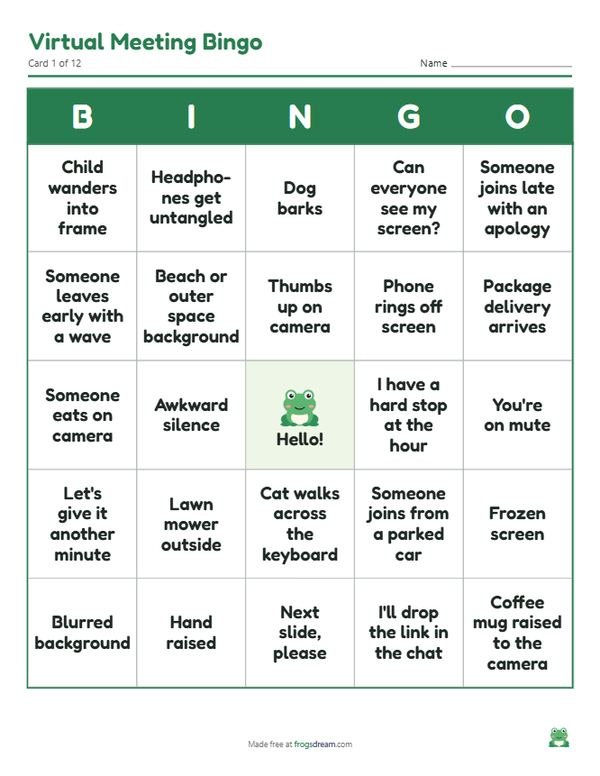
How to play bingo on a video call
Video call bingo needs no shared board and no special software. Each person has their own card, either printed or open as a PDF on a phone or second screen, and marks a square when the moment on it happens live during the call.
- Generate one card per teammate and download the PDF. Every card is different, so send the file and tell each person which page is theirs, or email one page each.
- Pick a host. On a short social call the host can point out moments as they happen; on a longer working meeting people simply self-mark and keep quiet.
- Agree what counts: only things that happen on this call, seen or heard by at least two people.
- The first person to fill a row types bingo in the chat or holds the card up to the camera.
- Keep going for a full card if the call is long, or start a fresh round with new cards next week.
Ways to play it with your team
- Social call edition. Play during a team coffee break where nobody needs to present. The host narrates and people cheer their own squares.
- Month-long card. One card per person for all the meetings in a month. Squares get marked across several calls and the winner is announced at the end.
- Onboarding round. Give new hires a card in their first week. It is a gentle way to learn that everyone struggles with the mute button.
- Hybrid room. People in the office share one printed card per table while remote colleagues each have their own.
Keeping it kind
The squares describe situations, not people. A dog barking or a doorbell ringing happens to everyone, and the game should feel like shared relief rather than a scoreboard of mistakes. Remove any square that could single out one colleague, such as the person whose connection is always weakest.
Tell the whole team the game is on before the call, including anyone who will present. Surprise bingo during a serious update is not funny for the presenter.
Let people mark their own cards without proof. A video call game runs on trust, and arguing about whether a screen really froze kills the mood faster than any cheating would.
Keep the squares about home life neutral. Children, pets and family members wandering through are part of remote work, so treat them as cheerful, never as a failing.
Print it or play from the PDF
Remote players rarely have a printer at hand, so the PDF matters more than paper here. One card per page is loaded by default, which fills a phone screen nicely and leaves room to tick with a finger in any PDF reader, or to keep a pen and a notepad next to the laptop. Office players can switch to two cards per page in black and white to save toner.
FAQ
How do remote players mark their squares?
Most PDF readers on a phone or laptop have a pen or highlighter tool. Otherwise players jot the square numbers on a scrap of paper, or hold a printed card next to the webcam.
Does the host need to call anything?
No. Players self-mark whenever a moment happens. A host helps on social calls to keep the energy up, but on a working meeting the game runs silently.
Can I use the online bingo caller with remote teams?
Yes, for number bingo. Share your screen with the bingo caller open and send each player a numbered card as a PDF beforehand. Video call bingo itself needs no caller.
How many squares do I need for a 5x5 card?
At least 24, since the center square is free. The list above has 40, so every card gets a different mix and two players rarely finish at the same moment.