Easy Christmas Word Search for Kids (Free Printable)
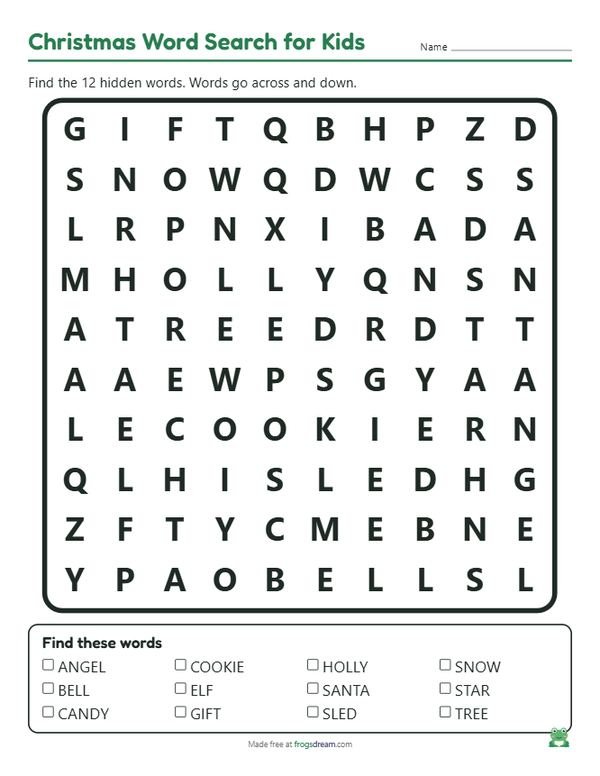
Print a free, easy Christmas word search for children aged 5 to 7. Twelve short words such as TREE, STAR, ELF and SLED hide across and down only, in a small grid with big uppercase letters that early readers can follow with a finger.
Loading your preview...
Want all 50 word searches at two levels, each with an answer key, in one download? Get the Mega Pack
The word list
Twelve words between three and six letters, all things a kindergartner can point to in December. Delete a few if your child is just starting to read, and the grid will stay the same friendly size.
- Tree
- Star
- Bell
- Gift
- Snow
- Elf
- Sled
- Candy
- Angel
- Holly
- Santa
- Cookie
How to do a word search with a 5 to 7 year old
A first word search is less about speed and more about discovering that letters in a row make a word. This puzzle keeps everything on the child's side: a 10 by 10 grid, words that only run left to right or top to bottom, and capital letters that match the alphabet chart on the classroom wall.
- Read the word list together first, pointing at each word. Ask the child to say the first letter of the word they want to find.
- Show how to scan one row at a time with a finger, looking only for that first letter.
- When a match turns up, check the next letter to the right and then below. If it fits, the child circles the whole word with a crayon.
- Cross the word off the list and pick the next one. Praise the finding, not the speed.
- Finish by reading the circled words aloud in a silly voice, or by drawing a small picture of each one beside the list.
Most children this age need ten to fifteen minutes for all twelve words with a little help on the longer ones. If attention fades, stop at six and keep the sheet for tomorrow.
Three gentle changes
- Six-word starter. For a child who is just learning to read, cut the list down to TREE, STAR, BELL, ELF, SNOW and GIFT. Six words in a small grid is a confident first puzzle.
- Color by word. Give each word its own crayon color and ask the child to circle the word and color the matching picture on the list in the same shade.
- Partner puzzle. Print two copies and let a pair of first graders race, but with one rule: each child may only circle words that begin with a letter the partner calls out. It turns a solo puzzle into a game.
Tips for parents and kindergarten teachers
Leave the difficulty on easy. Diagonal and backward words frustrate early readers, who are still learning that English reads left to right. Save the trickier settings for older siblings.
Keep the answer key handy but out of sight. Rather than pointing at the word, give a hint such as "it is in the top half" or "look in the row that starts with S". The child still gets the moment of finding it.
Short holiday words double as sight-word practice. After the puzzle, ask the child to write two or three of them on a card for the fridge, or to find the same words on a wrapping-paper roll or a greeting card around the house.
Printing for small hands
Large print is on by default, so the letters and the word list come out big enough to trace with a finger. Print on plain paper; a thick crayon or a chunky pencil is easier for a five year old to hold than a fine pen.
The answer key prints as a second page. For a class, print one key for your desk and skip the rest, or print several different puzzles from the same list so children sitting together each get their own arrangement.
FAQ
What makes this Christmas word search easy?
The words are short, between three and six letters, they hide only across and down, the grid is small and the letters are large uppercase. A child who knows the alphabet can finish it with a bit of help.
Which grade is this puzzle for?
Kindergarten and first grade, roughly ages 5 to 7. Preschoolers can try the six-word version with a grown-up, and second graders may prefer the regular Christmas word search with longer words.
Can I use my own words?
Yes. Type your child's name, your town or a few favorite toys into the word box, keep them short, and press Generate. The grid adjusts itself, and the answer key updates too.