Remember When Word Search (Free Large Print Puzzle)
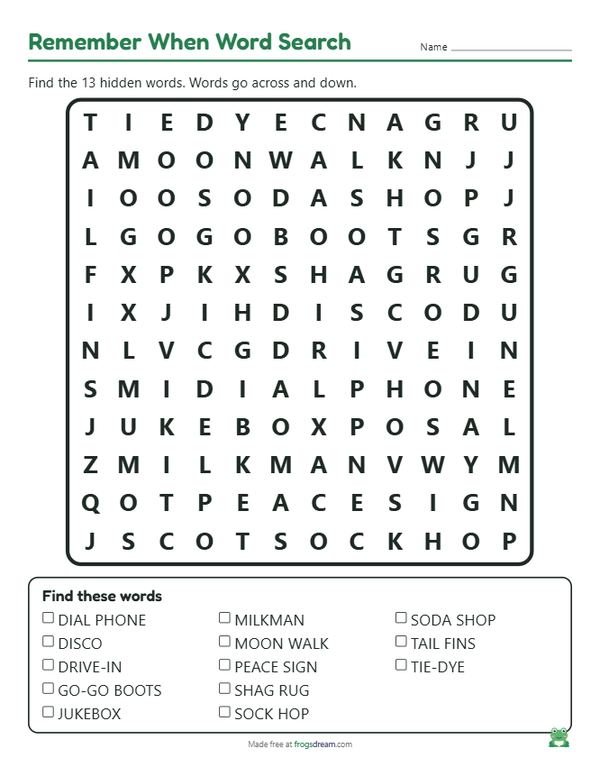
Print a free large print word search with 13 words from the 1950s, 1960s and 1970s, from jukebox and milkman to tie-dye and disco. It is set to Large print and easy mode with capital letters, so the letters are big and the words run only left to right and top to bottom.
Loading your preview...
Want all 50 word searches at two levels, each with an answer key, in one download? Get the Mega Pack
The word list
Thirteen short words, none longer than nine letters, spread across three decades so the grid stays small and the letters stay big. Hyphens and spaces disappear in the grid, so DRIVE-IN is found as DRIVEIN. Add words from your own residents' lives, such as a hometown or a favorite dance.
- Jukebox
- Sock hop
- Drive-in
- Milkman
- Dial phone
- Soda shop
- Tail fins
- Go-go boots
- Tie-dye
- Peace sign
- Moon walk
- Disco
- Shag rug
Using the puzzle in an activity room
A word search is one of the few activities that works for a resident sitting alone at a table and for a group doing it together on a whiteboard. This one is built for both: the grid is small, the words are short, and each one is a doorway to a story.
- Print one copy per resident and keep the answer key for yourself. Hand out pencils with soft, dark lead or thick felt pens, which are easier to see than a pencil line.
- Read the word list aloud before anyone starts. Ask who remembers a dial phone, or who worked at a soda shop. Let the stories come first.
- Give the room ten or fifteen minutes. Residents who finish early can tell the table where they found the hardest word.
- Finish by going through the list together and marking the words on a large copy taped to the wall or shown on a screen.
Ways to vary it
- One decade at a time. Delete the sixties and seventies words, add more from the fifties, and generate again. Three puzzles over three weeks make a small series.
- Family words. Before a family visit, ask relatives for a few words from the resident's own life, such as the street they grew up on or the make of their first car, and build a personal puzzle in a minute.
- Partner puzzle. Pair a resident who sees well with one who does not. One reads the letters, the other finds the pattern. It is a kind way to include people with low vision.
Tips for large print and low vision
Keep the grid at 12 by 12 or smaller. A bigger grid shrinks the letters, and a word search is only fun when every letter is clear. If the generator says the grid grew to fit the words, remove one or two of the longer words instead of accepting the larger grid.
Easy mode is the right choice for most senior groups. Words run forward and downward only, so nobody has to read backward or on a diagonal. Capital letters are easier to tell apart in print than lowercase.
Good light matters as much as big letters. Seat residents near a window or under a lamp, and print on white or cream paper with plain black ink.
Guidelines from the American Printing House for the Blind say true large print starts at 18 point type, in a font without serifs. The Large print box in Options is ticked on this page: it prints the grid in big bold sans-serif capitals over 20 point and the word list at 16 point, and it warns you if the grid grows so large that the letters drop below 20 point.
Printing the puzzle
Set Puzzles to the number of different versions you want. Each one has the same words in a fresh layout, which stops neighbors from copying and gives you a new puzzle for next week.
Leave the answer key on so a volunteer can check work without searching. Print the key separately and keep it off the tables.
FAQ
Is this word search large print?
Yes. The Large print option is on, so the grid letters are over 20 point and the word list is 16 point, which is above the 18 point that counts as large print for body text. Reading the list aloud still helps residents with very low vision.
Why are there no diagonal or backward words?
The page is set to easy mode on purpose. Backward and diagonal words are hard on tired eyes and frustrate people who are new to word searches. You can switch to medium in the Options box if your group wants a challenge.
Can I make a puzzle about one resident's life?
Yes. Replace the words with names, places and hobbies from that person's story and press Generate. It makes a lovely birthday page or a conversation starter for family visits.